
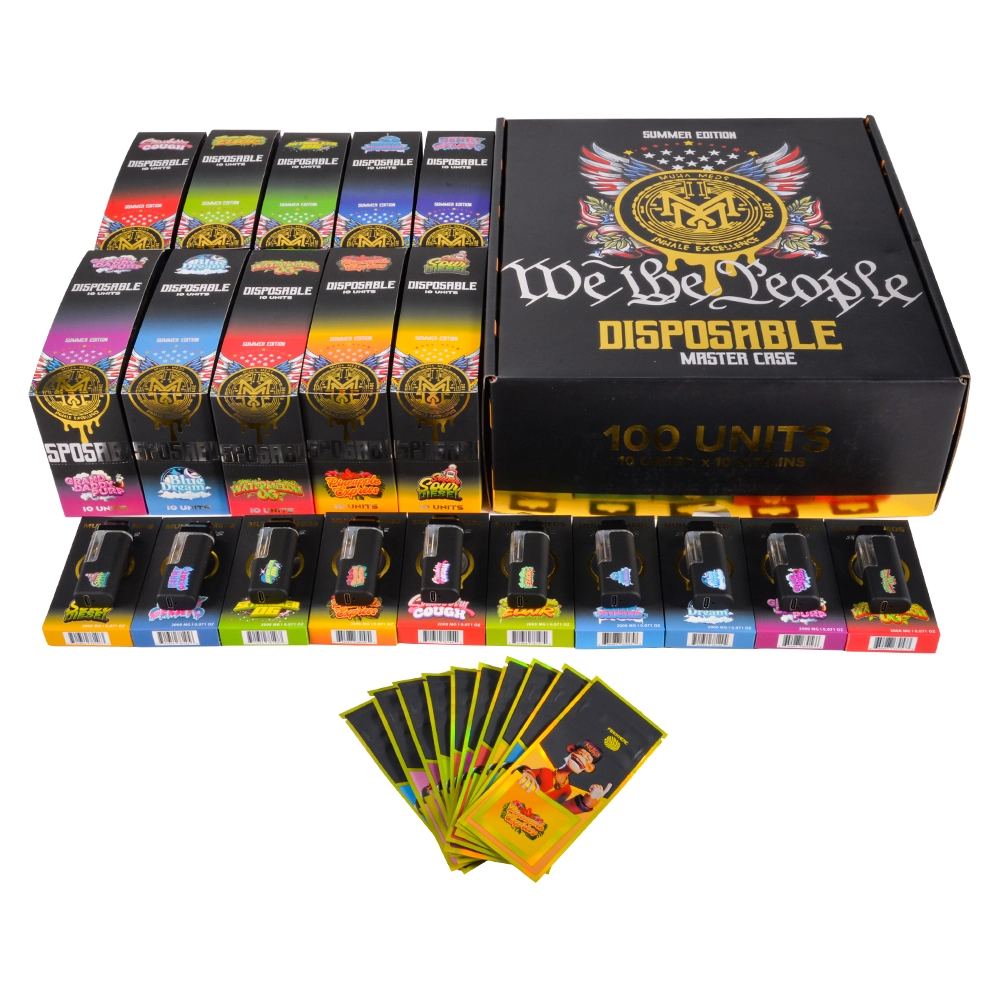
If you’ve seen posts or menu listings for “Muha Meds LED” disposables, this page breaks down what the “LED” part typically means (screen or indicator light), the formats you’ll likely encounter, and the safety-first checklist to verify both the retailer and the package before you buy.
Quick note: Muha Meds lists all-in-one disposables on its brand site, and provides an official verification flow. Specs (USB-C, screens, capacities, oil type) vary by release—treat them as model-specific and confirm on the licensed retailer’s product page and the box in your hand.
What “LED” usually means on a Muha-style disposable
Across the market, “LED” can mean either a simple status light (draw/power/charge indication) or a mini screen showing things like battery/level on certain SKUs. Because collaborations and batches change, don’t assume every “Muha Meds LED” device has a screen—check the current listing and the printed features on the package for the exact model you’re buying. The brand’s disposables category page shows their all-in-one format but not every SKU will share the same interface.
Step 1 — Verify the retailer (before you read the box)
Counterfeits overwhelmingly surface outside the licensed channel. In California, check these state tools first:
-
Real CA Cannabis — DCC’s consumer map of licensed retailers statewide. If a shop isn’t here, treat any “Muha Meds LED” claims as unverified.
-
DCC License Search — updated daily; verify a business and file a complaint if needed. (Many cities, like Los Angeles, direct residents back to this lookup.)
Outside CA, use your state regulator’s license search (state cannabis control or health department); rules and availability differ by state.
Step 2 — Verify the product: two-step authenticity (scan → scratch/PIN)
Muha Meds runs an official two-step verification flow:
-
Locate the verification sticker on the box.
-
Scratch to reveal the unique code beside the QR.
-
Scan the on-package QR; the code auto-fills on the verify page.
-
Tap Verify to confirm that exact unit.
Muha Meds also hosts a dedicated verify portal that uses the same scan-plus-code model. If your packaging references a transition notice, follow the brand’s link from the verify page. If a scan lands on an unfamiliar domain or shows “already used,” treat the result as inconclusive and ask the licensed retailer to assist.
Step 3 — Scan QR codes safely (FTC guidance)
Only scan QR codes printed on sealed packaging or posted inside licensed stores. The U.S. FTC warns that scammers hide phishing links in QR codes (“quishing”), including on unexpected packages and stickers. If a scan asks for personal data, prompts an app download, or the URL looks off, back out and navigate to a known brand site directly.
Step 4 — Packaging & labeling checklist (CA example)
In California, manufactured products (like filled disposables) must include specific items on the package—brand/manufacturer info, batch/lot, cannabinoid content, required warnings, and placement/typography rules. Compare the box against DCC’s Manufactured Products Labeling explainer and its downloadable checklist; a QR page does not replace information that must be printed.
If your state differs from CA, look up your regulator’s labeling guidance or ask the licensed retailer to show compliance details for that SKU.
How to read “LED” behavior (generic tips that apply to many models)
Because “LED” implementations vary, use these generic cues and then verify with the actual box or user card:
-
Draw light / puff feedback: a small LED may blink while you draw or when the device hits protection limits (e.g., long-draw cutoff).
-
Charging indicator (USB-C models): steady vs. pulsing light often shows charging vs. full—confirm on the included instructions for your exact unit.
-
On-device display (certain SKUs only): some market listings show mini screens for battery/level; do not assume screens on every “LED” model. Confirm on the licensed product page and package.
Everyday benefits of an LED-equipped disposable (experience-level, not health claims)
-
At-a-glance status: LEDs can signal draw, charging, or fault states, reducing guesswork vs. fully “blind” devices.
-
Lower setup burden: pre-tuned disposables remove coil/tank choices; many users experience more repeatable draws unit-to-unit compared with DIY setups (still verify the product and retailer as above). Time-saver for casual use: if the goal is quick, fuss-free sessions, a simple indicator or screen can help you decide when to recharge or replace without trial-and-error.
Important: precise battery capacity, puff counts, screen presence, and oil type (“live resin,” “melted diamonds,” etc.) are not universal and change by release. Always confirm on the licensed retailer’s PDP and the printed box for the specific SKU you’re buying.
CR/TE terms used correctly (packaging expectations)
If you evaluate packaging, use the regulatory terms Child-Resistant (CR) and Tamper-Evident (TE). Under the U.S. Poison Prevention Packaging Act (PPPA) and 16 CFR Part 1700, CR means packaging is significantly difficult for children under five to open yet usable by adults—avoid the vague “child-proof” claim.
Fast “real vs. red flags” table (CA example)
| Checkpoint | Real (what you should see) | Red flags |
|---|---|---|
| Retailer | Listed in Real CA or your state’s license search | Not listed; evasive about licensing |
| Labeling | Brand/manufacturer, batch/lot, cannabinoid content, required warnings; layout matches DCC checklist | Missing batch/lot; generic warnings; odd fonts/placement |
| Package | CR + TE evident; seals intact; professional print | “Child-proof” buzzwords; flimsy wrap; misprints |
| Verify | Scan → scratch/PIN completes on official verify page | Unknown domain; no second step; “already used” |
| Claims | Features match printed box and licensed PDP | “Screen/USB-C/2g” promised only in social posts |
FAQs
Does every “Muha Meds LED” have a screen?
No. “LED” might be a status light or a mini display depending on the SKU. Confirm on the licensed retailer’s product page and the printed features on your box.
How do I verify a Muha Meds unit?
Use the brand’s two-step flow: locate the sticker → scratch to reveal code → scan the on-package QR → tap Verify. If you hit a strange domain or “already used,” ask the licensed retailer to assist.
Should I scan any QR I see online to “check authenticity”?
No. The FTC warns about QR phishing (“quishing”). Scan only codes on sealed packages or signage inside licensed stores; verify the URL before entering info.
What exactly should be on a compliant vape package in CA?
Use the DCC Manufactured Products Labeling explainer + checklist PDF as your side-by-side. A QR page doesn’t replace required printed items.
Why are specs different from post to post?
Collaborations and batches vary by market and release. Treat specs as model-specific; rely on the licensed PDP and the box in hand.
References (authoritative)
-
Muha Meds — Disposables (brand category overview).
-
Muha Meds — Verify (official 2-step: locate sticker → scratch code → scan QR → verify).
-
MuhaVerify.com (brand verify portal using scan + code).
-
Real CA Cannabis (DCC consumer map of licensed retailers).
-
DCC — Labeling requirements + Labeling checklist (PDF) for manufactured products.
-
CPSC / PPPA + 16 CFR Part 1700 (legal definition of child-resistant packaging).
-
FTC — consumer alerts on QR code (“quishing”) scams (2023, 2025).
If you want to more vape wholesale pls go through these pages:muha meds wholesale|muha meds disposable bulk|muha meds bulk 2025
0 Comments