
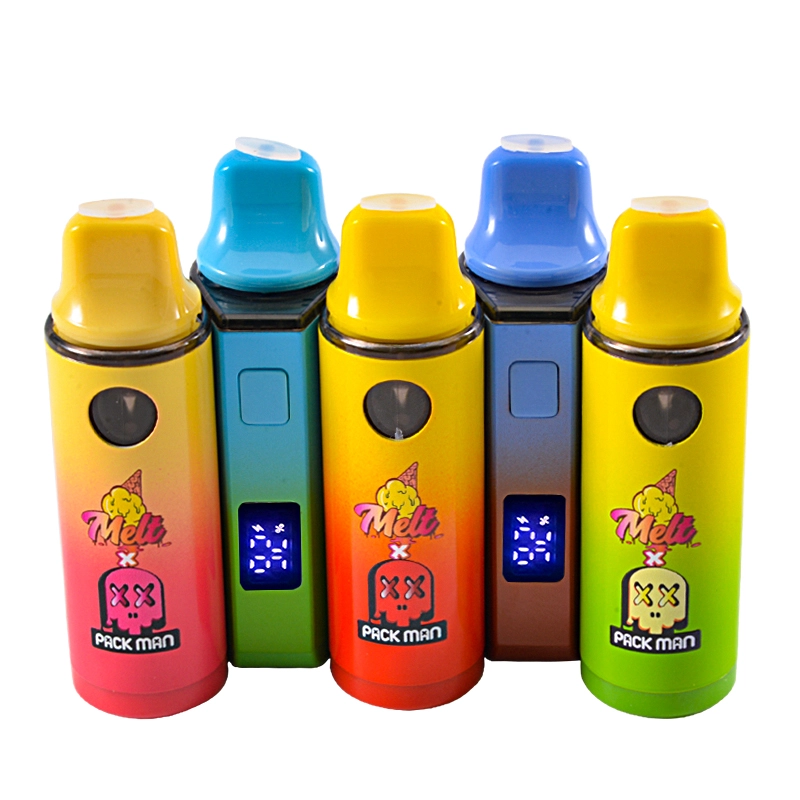
If you’ve seen Melt × Packman vapes on menus or socials and want a simple primer, this guide covers: what the collab label typically refers to, the 1-gram disposable/cart format, how specs vary by seller, and the safest way to verify you’re buying the real thing from licensed stores.
What “Melt × Packman 1G” usually means
-
Brand context. Melt operates as a cannabis brand with vapes and other SKUs; product families and flavors evolve over time. Use brand-run pages as your baseline for where Melt sits in the legal market, then cross-check the specific collab SKU locally.
-
Collab label on menus. Retailer listings commonly advertise Melt × Packman disposables/carts in 1 g and 2 g formats; details (fill type like “liquid diamonds / live resin,” flavor lists, rechargeability) differ by state and seller. Treat any single shop page as market-specific rather than universal spec.
-
Feature callouts vary. Some promotions and social posts emphasize extra features (e.g., USB-C charging or a mini display). Consider these SKU-dependent—verify on your local, licensed menu before you buy.
TOFU tip: “1G” means 1 gram of fill (mass), not 1 mL (volume). Densities differ, so don’t equate g with mL in your expectations or cost math.
Typical spec signals to confirm (before checkout)
Because Melt × Packman SKUs aren’t standardized across all markets, confirm these on the box/menu:
-
Capacity: 1 g (vs. 2 g alternatives). Retailers often stock both.
-
Filling type: Terms like “live resin” or “liquid diamonds” are brand/processor choices and can change by state. Cross-check the strain and fill type on the listing and the package.
-
Power & I/O: Whether the device is rechargeable (USB-C) and any extra UX features (pre-heat, display). Treat social/third-party claims as unverified until you see the actual box.
The safe way to buy: start with licensed retailers
Most counterfeit complaints trace back to unlicensed sellers. In California, you can verify a store’s status in two official ways:
-
DCC License Search – the state’s live database of licensed businesses (retailers, distributors, manufacturers).
-
Real CA Cannabis – the state’s consumer site with a map of licensed retailers. If a shop isn’t on either, treat any Melt × Packman device there as unverified.
(Outside CA, use your state’s cannabis regulator site or verified marketplace pages that display license information.)
Authenticity checklist (two minutes at the counter)
-
Scan → then scratch/PIN. Many brands use two-step verification: scan the on-box QR to reach a product page, then enter a hidden scratch code/PIN to complete the check. This second step prevents reused QR screenshots. (CannVerify documents this exact “scan + code” model.)
-
Use only on-package codes. The FTC warns that scammers increasingly hide phishing behind QR codes (“quishing”). Only scan codes printed on the sealed retail package; avoid QR codes from flyers, emails, or loose stickers.
-
Match the box. Capacity (1 g), strain/flavor, and fill type must match your menu listing and the device label.
-
Look for batch/lot. Batch/lot IDs and required warnings are a basic expectation in regulated markets (placement and wording vary by state). In California, consult DCC’s packaging/labeling resources for what compliant labeling looks like.
Why counterfeits matter (quick safety context)
In 2019, U.S. health authorities linked vitamin E acetate to many lung-injury (EVALI) cases tied to informal-market THC products, underscoring why licensed chain-of-custody and verifiable batch info are important. While that crisis was distinct and time-bound, its lesson remains: prioritize licensed sources and verifiable packaging. (For current rules, rely on your state regulator; do not expect “FDA-approved” cannabis vapes—FDA’s tobacco/ENDS program is separate and for nicotine products.)
What shoppers ask about Melt × Packman 1G (TOFU FAQs)
Is there an official, single spec for “Melt × Packman 1G”?
No. “1G” describes capacity. Retailer pages show 1 g and 2 g products in this collab lane with different features and flavor sets depending on the market. Confirm your exact SKU on a licensed menu.
I saw a post claiming a color screen/USB-C on a 1G device—is that standard?
Treat those as specific SKUs or batches. Some promos show a mini display or USB-C, but features can differ by seller and release. Verify on the box/menu in your state.
How do I avoid fake QR codes?
Scan only the code on the sealed package, then complete any scratch/PIN step on the brand’s domain. The FTC highlights a rise in QR-based phishing—don’t scan random codes from flyers, emails, or unsolicited packages.
Where can I see if a store is legit (California)?
Use the DCC License Search and the Real CA map of licensed retailers before you go.
Bottom line for 2025 buyers
-
Treat “Melt × Packman 1G” as a capacity + collab label with market-specific specs.
-
Buy through licensed retailers you can verify with the state database/map.
-
Finish the two-step authenticity check (scan + scratch/PIN) on a legitimate domain.
-
Be skeptical of one-size-fits-all spec claims from third-party shops; confirm on the actual box in your jurisdiction.
References (authoritative & recent)
-
California DCC: license search & consumer resources (what “licensed” means, how to verify).
-
Real CA Cannabis: map of licensed retailers.
-
FTC consumer alerts on QR-code phishing (“quishing”) and unexpected packages.
-
Retail/menu examples showing Melt × Packman in 1 g and 2 g formats (specs vary by seller/market).
-
Feature examples (social post) indicating certain 1G devices may include USB-C or a display—verify locally.
If you want more vape in USA, you can go through those pages: empty disposable vape|2ml disposable|melt packman wholesale|melt packman disposables
0 Comments