
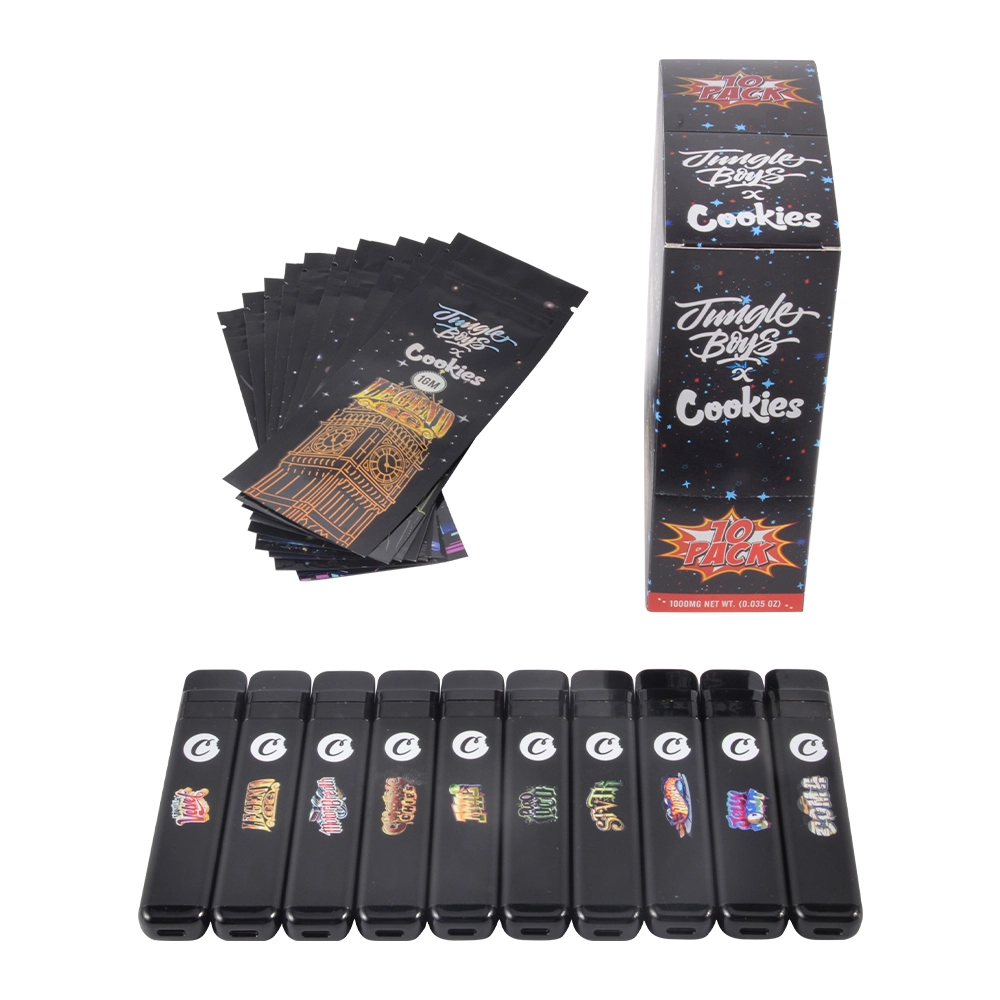
Scope & safety note: This article is written for U.S. B2B sellers and focuses on packaging, seals, and scan-to-verify workflows used to reduce returns and chargebacks. It does not include any instructions that help bypass, forge, or defeat verification systems.
Jungle Boys x Cookies Empty Disposable (Hardware Only): Packaging, Seals, and Verification Checks U.S. B2B Buyers Expect
When your buyer’s buyer says “this looks fake,” the real damage usually isn’t the single return—it’s the chain reaction: inventory gets mixed, your proof gets messy, and the dispute turns into opinions instead of facts. This playbook fixes that. You’ll get a repeatable receiving workflow, a safer scan-to-verify SOP, and a Proof Pack system that makes returns and chargebacks easier to prevent and faster to resolve.
1) Scope & Positioning (Read This First)
This playbook is written for Jungle Boys x Cookies “style” empty disposable hardware programs and the operational reality of U.S. B2B selling: receiving checks, documentation, and dispute prevention. We avoid claims like “official/authorized” unless you can prove licensing in writing, and we avoid any content that could help someone copy packaging or defeat verification.
What this playbook delivers:
- Fewer returns by catching anomalies before inventory is commingled.
- Fewer chargebacks by building a clean evidence trail (Proof Pack).
- Faster onboarding for wholesale accounts by answering their “proof” questions upfront.
2) What Buyers Actually Ask Before They Stock (B2B Expectations)
“Is it truly hardware-only, and can you state that on the paperwork?”
Your buyer needs the statement on the invoice and packing list, not just the product page. This prevents receiving confusion and reduces “not as described” disputes.
“Can you prove consistency across cases?”
Most authenticity disputes are really consistency disputes: mixed layouts, inconsistent labeling, and different packaging inside the same master carton. Your goal is to validate “one controlled run” at receiving and document it.
“What’s your DOA/returns policy with evidence rules?”
Buyers trust sellers who define the workflow: inspection window, what counts as a fail, what evidence is required, and how replacements/credits are handled. Clear policy turns arguments into a predictable process.
“What documentation do you provide per PO?”
The strongest answer is a single phrase: We provide a Proof Pack folder per PO (photos, logs, and verification screenshots tied to case IDs).
3) Spec-Lock Checklist (Stop “Same SKU, Different Internals”)
B2B returns often happen when a buyer receives “the same SKU” with different internal builds or packaging configuration. Prevent it by locking what matters before you push volume.
Lock key fields per PO
- Hardware version or run identifier (and what external marking identifies it).
- Battery / charging attributes (mAh, port type) as declared by your supplier.
- Coil type / resistance band as declared (so cartons don’t mix builds).
- Packaging configuration: units per inner/master, insert set, tray layout.
Require a simple batch change log
If anything changes (layout, insert, markings), document: what changed, when, why, and how to identify it at receiving. One page can prevent weeks of dispute when a customer says “this doesn’t match the last shipment.”
Carton labeling standards
Keep labels readable and consistent so your warehouse can isolate by case ID and avoid commingling. If you can’t isolate quickly, every small anomaly becomes a full-PO problem.
4) Packaging Map: What to Inspect Fast (Before Inventory Gets Mixed)
Outer carton checks (case-level)
- Photograph the sealed carton and the carton label before opening.
- Confirm the carton matches the PO (count and configuration).
- Note any damage that could explain later complaints (crush, tears, water exposure).
Unit packaging checks (consistency over perfection)
Don’t obsess over “one perfect unit.” Sample several units and evaluate whether the packaging pattern repeats: print alignment, label placement, insert presence, and layout.
Layout repeatability is a trust signal
If the tray orientation or inserts vary inside the same master case, it’s a HOLD trigger. Inconsistency is often what causes the buyer to label the shipment “suspect.”
Hold triggers (simple and strict)
- Missing components vs packing sheet
- Two different layouts inside one case
- Obvious signs of re-opening or damaged seals
5) Seals & Tamper Evidence: Receiving Checks That Reduce Returns
Non-destructive seal integrity checklist
- Placement consistency across sampled units (same spot, same orientation).
- Visible compromise (tears, wrinkles, partial lift) triggers an exception record.
- Handling check: does normal handling cause lifting? If yes, HOLD.
Photo angles that settle disputes
- Sealed carton: label + seal visible in one frame
- Close-up: seal details readable
- First-open: inner layout photo (how packed on arrival)
- Exception set: any anomaly gets its own photo group + case ID
Rule: Do not commingle inventory until the case passes checks. Mixing “maybe” units into sellable stock is how minor anomalies become expensive returns.
6) Scan-to-Verify SOP (Safe Scanning + Evidence Capture)
Safe scanning steps (domain-first)
- Scan → pause. Don’t enter codes or submit data until you confirm the destination is expected.
- Capture evidence. Screenshot the domain/URL and the outcome page.
- Sample per case. Verify multiple packs per master case, not just one “good” unit.
- Log outcomes. Record PO, case ID, sample count, date/time, and pass/fail notes.
Define outcomes so staff don’t guess
- Pass: file screenshot + log, proceed.
- Fail / Not found: quarantine the case and escalate with evidence.
- Redirect: treat as high-risk; quarantine and verify using your official channel.
Exception handling (containment beats debate)
If results vary across units in the same case, expand sampling and isolate by case/inner boxes. The priority is to prevent mixed inventory and preserve an evidence trail.
Best-practice note (industry framework)
If you ever build your own verification infrastructure, look at standardized approaches (like GS1 Digital Link) that connect product identity to controlled, predictable URLs. This is a framework reference—not a claim about any specific brand implementation.
7) Table: Issue → Symptom → Check → Evidence → Resolution
This matrix turns “authenticity disputes” into operational actions. Use it for training and for consistent claim handling.
| Issue / failure mode | Buyer symptom / complaint | Receiving check (non-destructive) | Evidence required | Quarantine threshold | Resolution path |
|---|---|---|---|---|---|
| Seal compromised | “Opened,” “tampered,” “not as described” | Visual + handling check; compare multiple units for consistency | Seal closeups + carton label + case ID | Any clear compromise | Hold unit(s) → quarantine case if repeated → claim with evidence |
| Layout inconsistent within a case | “Mixed batch,” “different version,” “doesn’t match listing” | Side-by-side compare sampled units | First-open layout photo + unit photos + log notes | Multiple inconsistencies in one case | Quarantine case → expand sampling → supplier escalation |
| Missing components | “Incomplete,” “wrong configuration” | Match to packing/config sheet | Photo + count log + case ID | Any mismatch | Hold affected cases → correct/replace per agreement |
| QR/scan redirects | “QR took me somewhere weird” | Scan and confirm domain before entering anything | URL screenshot + redirect evidence + case ID | Any redirect anomaly | Quarantine immediately → escalate with screenshots |
| Verify = fail / not found | “Code invalid,” “not verified” | Verify multiple units + confirm official channel | Outcome screenshots + sample log + unit photos | Any fail; escalate fast if repeated | Quarantine → claim / replace / credit per policy |
| Mixed verify outcomes in same case | “Some pass, some fail” | Increase sampling; isolate by inner box if available | Case map + screenshots set + exception log | 2+ failures in one case | Quarantine case → prevent commingling → investigate source |
8) Proof Pack System (Documentation Buyers Expect Per PO)
A Proof Pack is one folder per PO that lets you resolve disputes quickly. It’s also the fastest way to build buyer confidence: you can show what arrived, what you checked, and what you did when anomalies appeared.
Case-level tracking
Assign a case ID to each master carton and store every photo/log/screenshot under that case ID. This is what prevents “everything is affected” chaos.
Standard receiving photo set
- Sealed carton / label / seal
- First-open layout
- Sampled units (front/back/close-ups as needed)
- Exception set (clearly separated)
Proof Pack checklist
| Item | What it proves | Owner | Format | Stored as |
|---|---|---|---|---|
| Invoice + packing list | Scope, quantities, shipment details | Ops | PO-####_Docs.pdf | |
| PO spec sheet (locked fields) | What was promised for this run | Purchasing/QA | PO-####_SpecLock.pdf | |
| Carton configuration sheet | Units/inners/master + inserts/trays | Warehouse | PO-####_CartonConfig.pdf | |
| Case-ID roster + batch mapping | Traceability & isolation | Warehouse | CSV/PDF | PO-####_CaseIDs.csv |
| Receiving photo set | What physically arrived | Warehouse | ZIP | PO-####_ReceivingPhotos.zip |
| Scan-to-verify screenshots + log | Verification outcomes tied to case IDs | QA/Receiving | PDF/PNG | PO-####_VerifyScreens.pdf |
| QC sampling log | Checks performed + results | QA | PO-####_QCLog.pdf | |
| Exception/quarantine log | Containment actions & resolution | QA + CS | PO-####_Exceptions.pdf | |
| Returns/DOA policy summary | Resolution rules | CS | PO-####_Policy.pdf |
9) Receiving QC SOP + Chargeback Response Kit (Make It Operational)
Receiving QC SOP (10–15 minutes per master case)
- Label the case (case ID) before opening; photograph sealed carton + label.
- Open and photo the first-open layout (tray orientation + inserts).
- Sample 3–5 units per case; increase sampling for new suppliers/batches.
- Run checks: packaging consistency + seal integrity + scan-to-verify (with screenshots).
- Log decisions: Pass / Hold / Quarantine—then store evidence under the case ID.
Sampling escalation triggers
- New supplier or new packaging run
- Any “hold trigger” (layout mismatch, missing components, compromised seal)
- Inconsistent verification outcomes within the same case
Quarantine decision tree
Pass → stock shelves. Hold → expand sampling + supervisor review. Quarantine → isolate case(s), launch claim workflow, and prevent any outbound movement until resolved.
Chargeback response kit (timeline, not debate)
- Timeline: PO → ship → delivery → receiving checks performed.
- Proof Pack excerpts: sealed carton photos, first-open layout, logs.
- Verification screenshots: outcomes mapped to case IDs.
- Containment record: hold/quarantine logs if anomalies existed.
- Resolution offer: replace/credit per policy (consistent rules win trust).
Team rule: “If it’s not documented, it didn’t happen.” That one sentence dramatically improves dispute outcomes.
FAQ
How many units should we scan-to-verify per master case?
Use a baseline of 3–5 units per master case. Increase sampling for new suppliers, new packaging runs, or any anomaly. The point is early detection before inventory is mixed.
What if scanning redirects to an unexpected domain?
Treat it as high-risk: quarantine the case, capture screenshots, and escalate with your Proof Pack. Don’t enter codes or submit information on look-alike pages.
Should we rely on packaging alone for authenticity confidence?
Packaging checks are a fast filter, but the strongest defense is layered: packaging consistency + safe verification checks + documentation. Your Proof Pack is what turns checks into dispute-ready evidence.
What’s the single biggest mistake that increases returns?
Commingling inventory before checks are completed. Once units are mixed, it becomes harder to isolate issues and prove what came from which case.
Can we reuse this playbook for other “style” lines?
Yes. Keep the same structure (spec lock, packaging map, seal checks, safe verification SOP, Proof Pack) and simply update the brand-specific receiving fields and official channels.
Do we need FAQ schema?
Only if the FAQs are fully visible on-page and you can keep them aligned with your markup. Otherwise, skip it and focus on clarity and buyer value.
0 Comments