
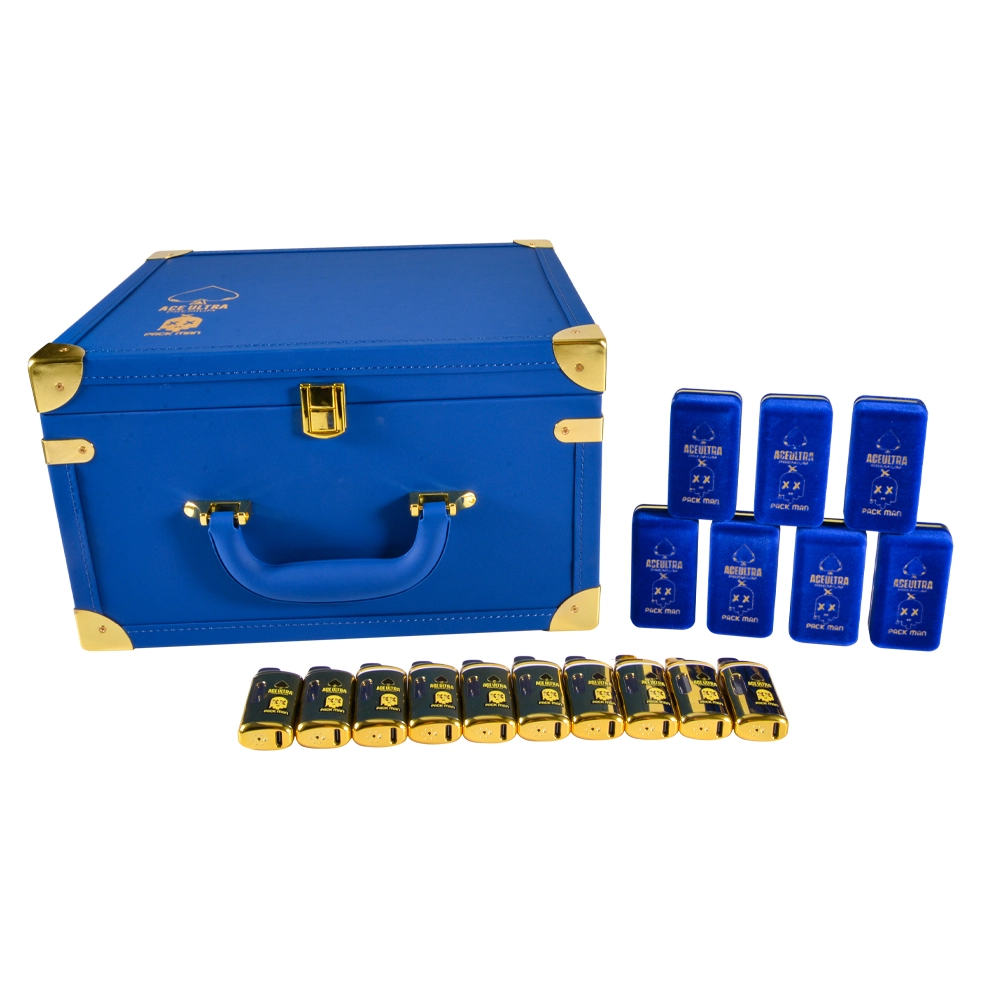
If you’re seeing “Ace Ultra Premium X Packman” on menus or social posts and want a simple explainer before you buy, this guide is for you. We’ll stick to practical, verifiable info: what this product class usually promises (portability and simplicity), how to confirm the exact features on the unit you’re buying, and how to avoid counterfeits by verifying both the retailer and the package.
Quick note: specs for filled disposables—USB-C charging, screens/LEDs, oil type (“live resin,” “liquid/melted diamonds”), and net contents (e.g., 1 g / 2 g / 3.5 g)—vary by batch and collaboration. Treat them as model-specific and confirm on a licensed menu and on the printed box in hand.
1) Start here: verify the retailer first
Counterfeits and misinformation most often appear outside the licensed channel. In California, you can confirm a dispensary in seconds:
-
Real CA Cannabis — the state’s consumer map of licensed retailers. If a shop doesn’t appear here, treat any “Ace Ultra Premium X Packman” listing as unverified.
-
DCC License Search — updated daily. You can check a business by name, see its status, find licensed stores nearby, and even file a complaint.
Outside CA, use your state cannabis regulator’s license search (names vary by state). Laws and availability differ; don’t assume one federal threshold makes every product legal everywhere.
2) What you’re buying (and what changes by model)
When people say “Ace Ultra Premium X Packman,” they usually mean a filled, ready-to-use disposable (not empty hardware). A few quick clarifications help avoid confusion:
-
“g” on the label is mass of oil (grams), not milliliters; densities differ by formulation.
-
Features like USB-C, pre-heat, screen/LED, and dual-chamber are not universal. Confirm on the licensed product page and the printed features on the box.
-
If the listing promises verification or batch traceability, expect a QR + hidden code (more on that below).
3) Everyday benefits (experience-level, not health claims)
-
Zero-setup convenience: pre-tuned disposables take the friction out of coil/tank choices. Many users experience more repeatable draws unit-to-unit versus DIY setups. This is an experience claim, not a safety guarantee—stick to licensed channels and the verification steps below.
-
Pocketable: one piece, no bottles or separate chargers to carry (USB-C cables are ubiquitous if your SKU supports charging).
-
Lower time cost: for busy users, “open, scan/verify, draw” is simpler than maintaining refillable kits.
Because collaborations evolve, don’t rely on reposted images for exact specs. Use licensed menus and the box in your hand to confirm particulars.
4) Read the package like a pro (CA example)
In California, finished goods like filled disposables must show specific items on the package—brand/manufacturer info, batch/lot, cannabinoid content, required warnings, and correct placement/typography. Use the DCC’s Manufactured Products Labeling explainer and its downloadable checklist as your side-by-side reference. A web/QR page does not replace info that must be printed on the box.
If your state isn’t CA, ask the licensed retailer for the equivalent state labeling rules or a compliance one-pager for that SKU.
5) Authenticity in two steps: scan → scratch/PIN
Reputable anti-counterfeit systems in cannabis typically require both a scan and a hidden code:
-
Scan the on-package QR to open the product page, then
-
Enter the hidden scratch/PIN/serial printed on the label to confirm that exact unit.
This two-step flow prevents simple QR screenshot reuse. If there’s no second step, the code shows “already used,” or the URL looks off, treat the result as inconclusive and ask the licensed retailer to help verify.
6) Scan QR codes safely (watch for “quishing”)
Only scan codes printed on sealed packaging or signage inside licensed stores. The U.S. FTC warns that scammers hide phishing links in QR codes (“quishing”), including on unexpected packages or stickers; a scan can send you to a spoofed site or try to install malware. If a scan asks for personal info or prompts an app download, back out and navigate to a known brand site directly.
7) CR/TE terms used correctly (packaging expectations)
When you evaluate boxes, use the regulatory terms Child-Resistant (CR) and Tamper-Evident (TE). Under the U.S. Poison Prevention Packaging Act (PPPA) and 16 CFR Part 1700, CR means packaging is significantly difficult for children under five to open yet usable by adults; avoid the vague marketing term “child-proof.”
8) Quick checklist: real vs. red flags (CA example)
| Checkpoint | What you should see | Red flags |
|---|---|---|
| Retailer | Store appears in Real CA or your state’s license search | Not listed; evasive about licensing status |
| Labeling | Brand/manufacturer, batch/lot, cannabinoid content, required warnings; layout matches DCC checklist | Missing batch/lot; generic warnings; odd fonts/placement |
| Package | CR + TE evident; seals intact; professional print | “Child-proof” buzzwords; flimsy wrap; misprints |
| Verify | Scan → scratch/PIN completes on an expected domain | Unknown domain; no second step; “already used” |
| Claims | Features match the printed box and the licensed menu | Specs shown only in social posts or third-party images |
Citations: Real CA/DCC; DCC labeling explainer + checklist; CannVerify two-step; PPPA/16 CFR.
9) FAQs
Does every “Ace Ultra Premium X Packman” include USB-C, a screen, or a specific oil type?
No. Treat those as model-specific features and confirm on a licensed product page and the printed box for the exact SKU you’re buying.
What does “1 g / 2 g / 3.5 g” actually mean?
It’s the mass of oil (grams), not mL. Different oils have different densities, so grams ≠ mL.
Is a QR scan enough to prove authenticity?
A scan alone is not definitive. Look for a two-step system that also requires a hidden scratch/PIN code to match your exact unit.
What should be on a compliant CA package?
Use the DCC Manufactured Products Labeling explainer and checklist as your reference; a QR page doesn’t replace the required printed items.
Any tips for scanning QR safely?
Follow the FTC’s guidance: scan only codes on sealed packages or inside licensed stores; verify the URL; never enter personal data on unfamiliar domains.
References (authoritative)
-
Real CA Cannabis — consumer map of licensed retailers (California DCC).
-
DCC License Search — updated daily; verify businesses and file complaints.
-
DCC — Labeling requirements: Manufactured cannabis products in final form (explainer) + Labeling checklist (PDF).
-
CannVerify — documented two-step anti-counterfeit model (scan + hidden scratch/PIN).
-
CPSC — PPPA and 16 CFR Part 1700 — legal definition of child-resistant packaging.
-
FTC — consumer alerts on QR (“quishing”) scams, 2023–2025.
If you want to know more vape wholesale , pls go through these pages:
0 Comments